Designing a Collector Preview Platform for Art Fairs

Improving how galleries present artworks and manage collector interest during events like PAD London

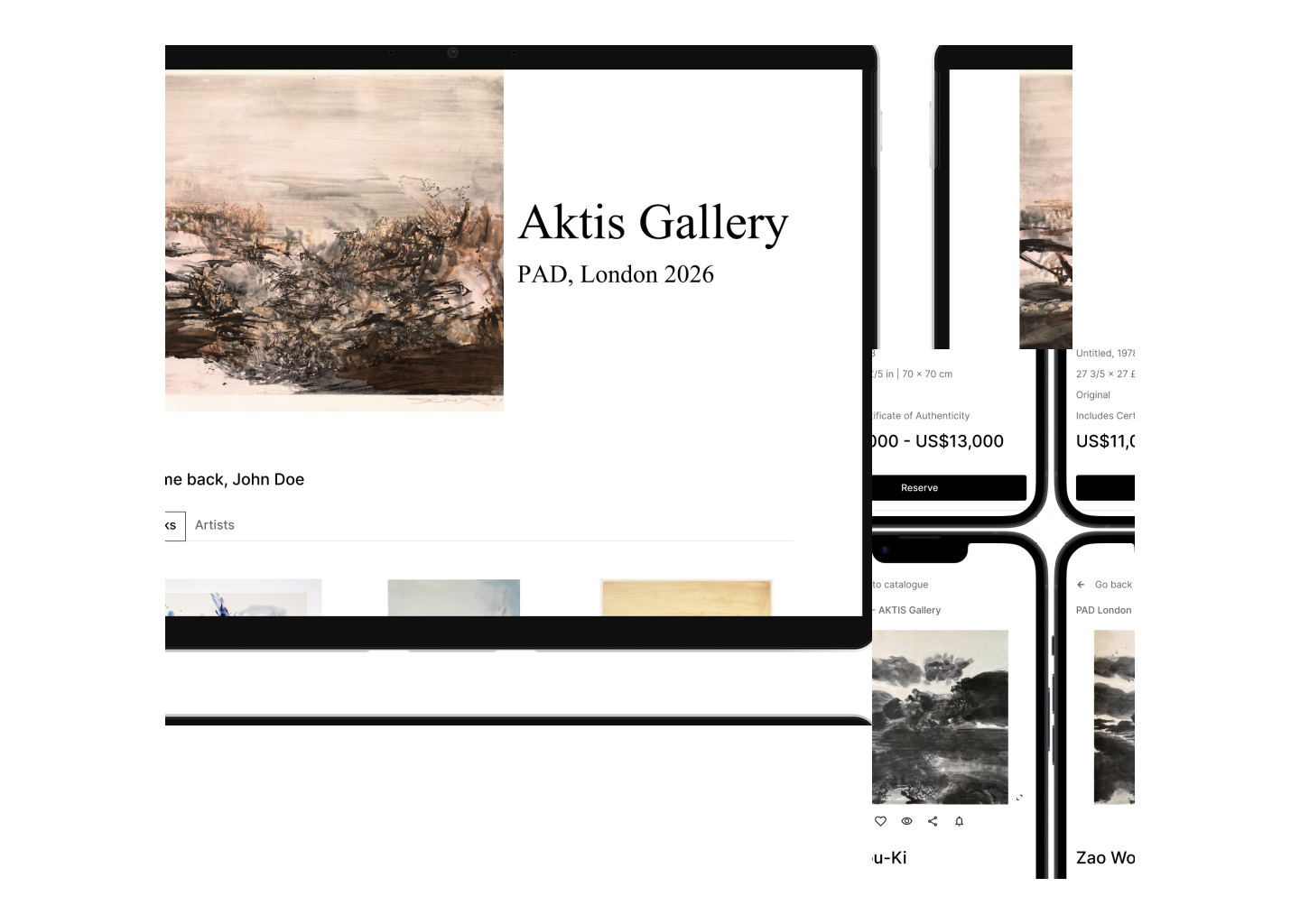
Illustration showing two mocks up: one screen displaying the collector preview platform, another iphone mockup showing the artwork details.
Role

Product designer (UX/UI) — end-to-end

Scope

UX, UI, and interaction design. Concept, wireframes, and high-fidelity prototypes

Project type

Concept redesign (artworks and collectors management)

Summary

During my earlier experience working with galleries at art fairs such as PAD London, I observed how much of the collector preview and sales process relied on fragmented and manual tools. Artwork information was typically shared through PDFs, email threads, and spreadsheets, making it difficult for both galleries and collectors to navigate and manage interest clearly.

These tools worked, but often required constant back-and-forth communication and manual tracking, especially during the intense pace of an art fair.

I explored how a dedicated digital platform could support galleries in presenting artworks, managing collector enquiries, and facilitating sales in a way that remains aligned with the tone and sensitivity of the art world.

This project focuses on designing a platform that supports both collectors and gallery teams during an art fair.

Context

Art fairs like PAD London are one of the most important sales environments for commercial galleries. Much of the activity happens during a short and intense period, often beginning with private preview days for invited collectors.

During preview days, galleries often need to respond to multiple collectors simultaneously while availability changes quickly, making clear information management critical.

Galleries need to:

  • share preview materials with selected collectors

    present artworks clearly and accurately

    respond quickly to enquiries

    track which works are available, reserved, or sold

Inspired by great tools available today, such as Artlogic and Artsy, I wanted to design a platform that feels accessible and easy to navigate for both collectors and gallerists. The design addresses problems that I have experienced while working in the art industry.

Problem

Through direct experience working with galleries and collectors, I observed several recurring friction points in how artworks and collector interactions were managed during art fairs.

Information was fragmented

Artwork details were often shared via static PDFs or email, which made it difficult to browse or compare works.

Limited visibility of availability

Collectors did not always have clarity on whether a work was still available, reserved, or sold.

Manual enquiry management

Galleries had to track collector interest manually across email and messages, increasing the risk of confusion.

Lack of continuity

There was no single, structured environment supporting both presentation and sales workflows.

Goal

To design a platform that allows galleries to:

  • present artworks clearly and elegantly

  • manage collector enquiries and reservations

  • maintain accurate visibility of availability

And allows collectors to:

  • explore artworks in a focused and calm environment

  • access accurate and trusted information

  • express interest easily

Design Principles

I defined several principles to guide the design:

  • Artwork-first presentation

    The interface should prioritise the artwork itself, with minimal visual distraction.

  • Clarity and trust

    Collectors need to feel confident in the accuracy and credibility of the information.

  • Continuity

    The experience should support the full journey from discovery to enquiry.

  • Sensitivity to context

    The platform should reflect the tone and pace of the art world, avoiding overly technical or transactional patterns.

Solution

I designed a platform with two main parts:

Collector experience

A private preview environment where collectors can browse artworks, view detailed information, and submit enquiries.

Gallery dashboard

A structured overview allowing galleries to manage artworks, track collector interest, and update availability.

Selected UI outcomes for Desktop
collectors preview page
Keen screen: Collector preview

While designing this page, I considered a behaviour I frequently observed during art fairs: collectors often revisit works they previously liked.

To support this, collectors access a personalised preview space where they can browse all available works presented by the gallery at the fair, and they can save artworks. Saved works appear at the top of the preview list during future visits, allowing collectors to quickly relocate pieces of interest without searching again.

The grid layout allows easy comparison while maintaining a calm and minimal visual structure.

This small interaction helps reduce friction during repeated visits to the preview environment.

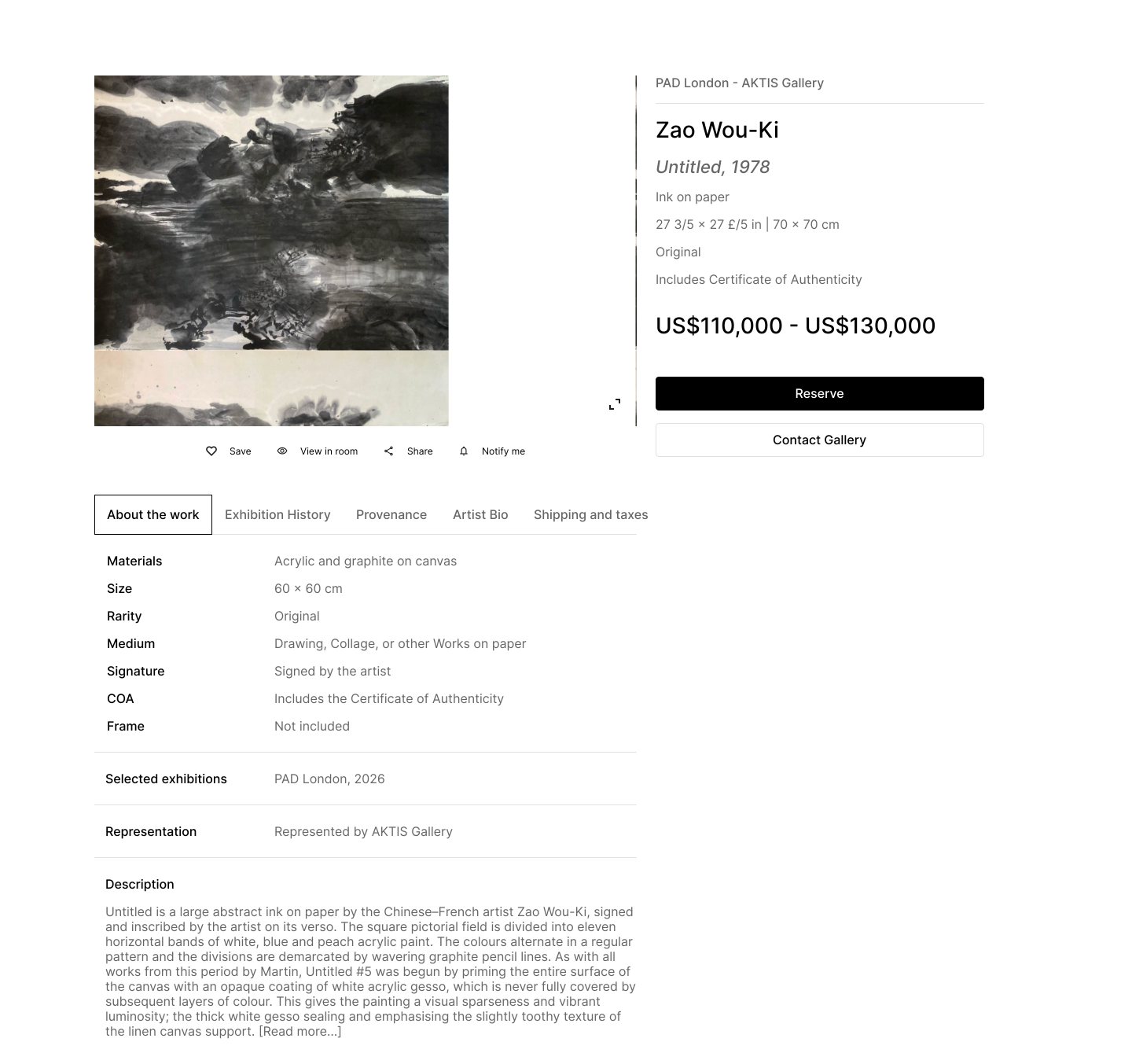
screens showing the collectors private view page, artworks details, and enquiry page
Keen screen: Artwork detail page

The artwork page is the core of the experience.

When collectors first encounter a work, they usually focus on a small set of core attributes before engaging further: the year, medium, dimensions, and edition information. Prioritising this information in the initial layout allows collectors to quickly evaluate a work without being overwhelmed by secondary content.

These details are usually the first criteria collectors evaluate before engaging further.

For this reason, the design separates essential artwork information from secondary content.

The top section of the page contains:

  • high-resolution artwork image

  • artist name and artwork title

  • key metadata such as year, medium, and dimensions.

  • price or price on request

  • enquiry and reservation actions

Additional information is organised into tabs below the main content.

These tabs contain:

  • artist's biography

  • exhibition history

  • provenance

  • shipping and tax information

This structure allows collectors to access deeper information when needed while keeping the initial view focused and uncluttered.

Another behaviour I frequently observed at art fairs is the need for collectors and advisors to share works with partners or clients before making a decision. To support this, a share option is placed directly beneath the artwork image, allowing users to quickly send the artwork details. This small feature supports the collaborative nature of many collecting decisions.

screens showing the collectors private view page, artworks details, and enquiry page
Keen screen: Gallery dashboard

During busy fair moments, gallery staff often need to locate artworks quickly while speaking with collectors. Filtering tools help narrow large artwork inventories using attributes such as medium, artist, or edition.

Gallery staff can:

  • view all artworks in the fair

  • track collector enquiries

  • update availability status

One of the challenges I frequently experienced while working in galleries was locating specific works within large databases — particularly when artworks shared similar titles such as Untitled.

Often the only distinguishing information was the medium, size, or edition.

To address this, the artwork database includes filtering options that allow staff to quickly narrow down results based on attributes such as medium, artist, or edition.

This reduces the time needed to locate a specific work when speaking to a collector in person or over the phone.

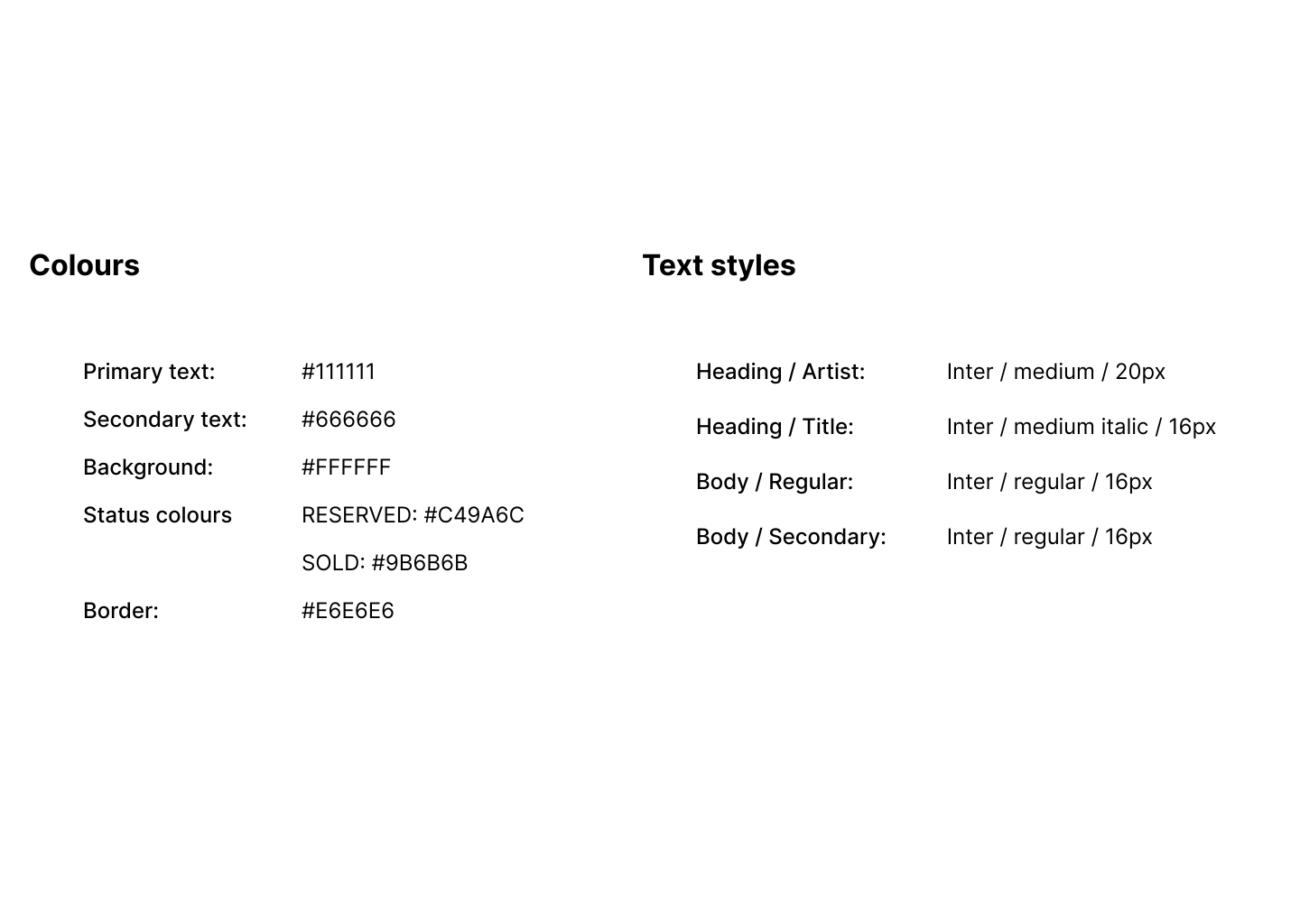
Availability is communicated using both colour and text labels, ensuring accessibility while allowing gallery staff to quickly identify the status of a work during fast-paced interactions.

Staff can update a work’s status directly from the dashboard, changing it from available to reserved or sold without needing to open the artwork page.

This allows galleries to respond quickly when sales occur in person at the fair.

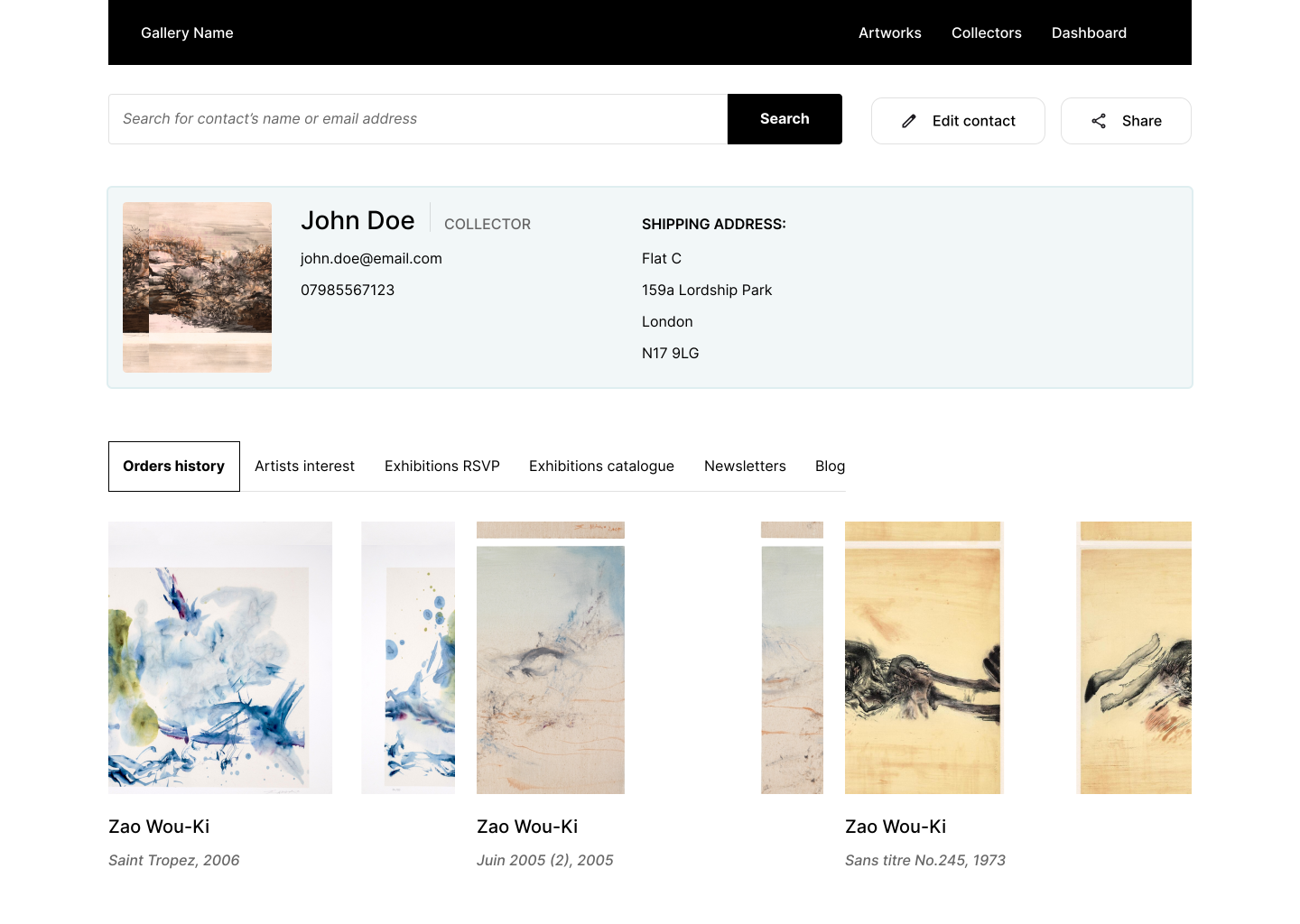
screens showing the collector's profile page
Keen screen: Collector page

The collector profile provides a structured overview of interactions with a collector.

From this view, galleries can:

  • track enquiry history

  • view previous purchases

  • identify artworks that the collector has shown interest in

Over time, this helps galleries build a clearer understanding of collector preferences and identify potential sales opportunities.

Quick prototype for mobile
Outcome

This project demonstrates how a digital platform can support the art fair sales process while respecting the visual and relational nature of the art world.

It translates workflows I observed firsthand into a structured and intuitive system.

Reflection

This project allowed me to connect my background in commercial galleries with my work as a product designer.

Having experienced these environments directly, I was able to approach the design with an understanding of both the practical workflows and the importance of presenting artworks in a way that feels appropriate and respectful.

The project reinforced my interest in designing tools that support cultural contexts and complex information environments.

I’m particularly interested in continuing to work on platforms that support galleries, artists, and collectors, and that help bring clarity and accessibility to the art ecosystem.

Note

Artist names, artworks, galleries, and prices shown in this project are used for illustrative purposes only. This project is a conceptual design exercise based on real workflows observed in gallery and art fair contexts.

Back to the top